Loading ZIP outlines…
ZipZoomer is a map of U.S. ZIP codes where you select ZIP codes by clicking, by drawing a circle or lasso, or by distance around a ZIP code, then copy or download the list. This page has the same instructions as the Help button on the map, with pictures, for computers and for phones and tablets.
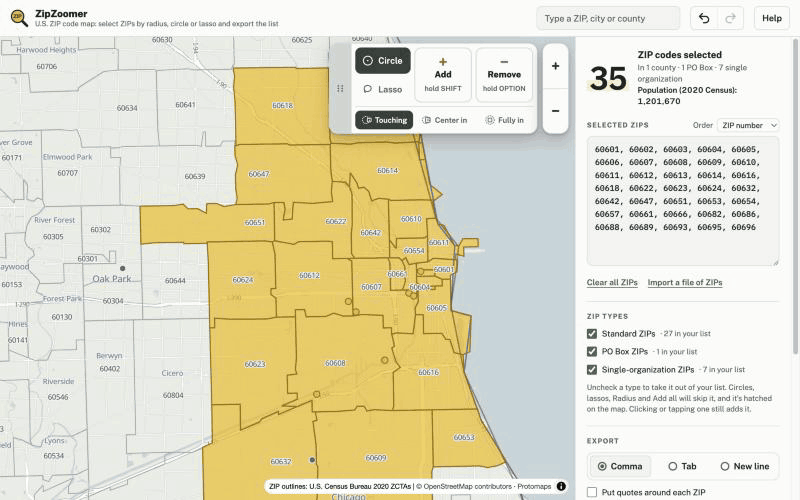
Quick start
- Find your area: type a ZIP code, city or county in the search box, or just type digits anywhere.
- Select ZIP codes: click or tap one, draw a circle or lasso, or press Radius next to a ZIP code in the search results and type a distance.
- Check the list in the list panel (on a phone, the ZIPs button at the top or the bar at the bottom).
- Copy, download or share it with the buttons at the bottom of the panel.
With a mouse or trackpad
- Click a ZIP code to add or remove it.
- Drag to move the map. Scroll or pinch to zoom.
- Hold SHIFT and drag to add every ZIP code your circle or lasso touches.
- Hold OPTION and drag (ALT on Windows) to remove them instead.
- Click Add or Remove to keep it on, so a plain drag selects. Click it again to turn it off. While one is on, a click only adds or only removes, and hovering shows which (yellow adds, red removes).
- Type digits anywhere to jump to a ZIP code.
- Command+Z undoes and Shift+Command+Z redoes (Ctrl+Z and Ctrl+Y on Windows), as do the arrow buttons next to the search box.
On a phone or tablet
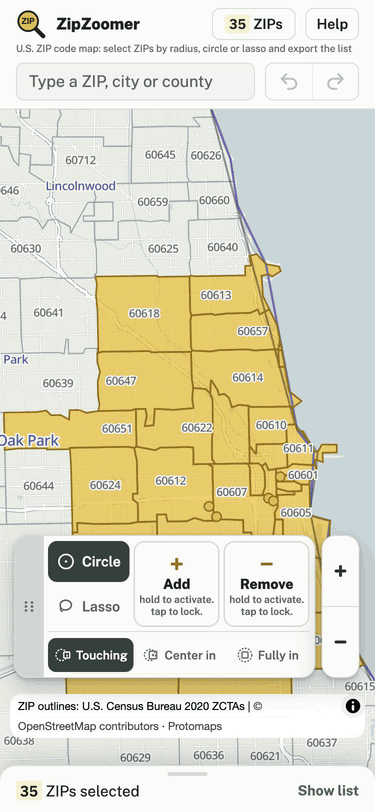
- Tap a ZIP code to add or remove it.
- One finger moves the map. Two fingers pinch to zoom.
- Hold Add or Remove with one finger and draw on the map with another.
- Tap Add or Remove to keep it on for one-handed drawing. Tap it again to turn it off.
- Open the list with the ZIPs button at the top or the bar at the bottom.
Circle, lasso and edge rules
Circle is measured from where you first press, with a readout of the distance; Lasso follows your outline. The switch under Add and Remove decides which ZIP codes count: Touching (any ZIP code the shape touches), Center in (its center point is inside) or Fully in (the whole ZIP code is inside). The drawing page has more.
Radius and Use my location
For an exact distance, type a ZIP code in the search box and press Radius next to it. A card opens with a distance box (up to 200 miles, mi or km); the circle and a yellow preview redraw as you type, and nothing joins the list until you press Add. With the search box empty, its first row is Use my location, which opens the same card around where you are after your browser asks. See the radius page and ZIP codes near me.
ZIP types
To leave out PO Box or single-organization ZIP codes (a company, university or government office), or to keep only those, uncheck the others under ZIP types in the list panel. Unchecked types leave your list (you can undo it) and are skipped by circles, lassos, Radius and Add all; they are hatched or faded on the map. Clicking one still adds it.
The list panel and export
- Selected ZIPs: the list as text. Type or paste ZIP codes into it, or press Import a file of ZIPs. Entries that are not ZIP codes are flagged under the box.
- Order: by ZIP number or in the order added.
- Export: comma, tab or new-line separators, optional quotes, or a spreadsheet table with city, state, county and type.
- Copy list, Download file, Copy share link (a link that opens the same list) and Save map image (a PNG of the map).
- The panel also shows the counties, states and 2020 Census population of your list.
Moving the boxes
The dotted grip on each floating box moves it: click or tap the grip to fold the box away into a small label, or drag it to put the box somewhere else. Reset layout in the Help box puts everything back.
Questions and answers
How do I select a whole city or county?
Type its name in the search box and press Add all next to it in the results. Remove all takes them out again.
How do I undo a mistake?
Press the curved arrow next to the search box, or Command+Z (Ctrl+Z on Windows). Redo with the other arrow or Shift+Command+Z (Ctrl+Y on Windows).
Is my list saved?
Yes, in your own browser, so it is there when you come back on the same device. Copy share link makes a link that opens it anywhere.
Why does drawing move the map instead?
A plain drag moves the map. Hold SHIFT while you drag, or click Add to keep it on; on a touchscreen, hold Add with one finger while you draw, or tap Add to lock it.
Related pages
- ZipZoomer: the full U.S. ZIP code map
- ZIP code radius map
- Draw an area and get the ZIP codes inside
- Map a list of ZIP codes
- Privacy: what ZipZoomer measures
Page updated · Data updated